
Instant games run inside your web browser, using the same technology that powers ordinary websites. Your browser fetches the game's files and runs them straight away, so there's nothing to install.
That sounds simple, but a browser has to do a lot of work to make it happen. Here's what goes on between your tap and the first level.
"No download" doesn't mean no data
Your device still has to receive the game. The difference is how. An app store download installs a package on your phone and keeps it there until you remove it. An instant game loads its files through the browser, much as a web page loads its images.
The browser may keep some of those files in temporary storage, called a cache. You don't have to manage any of this, and no app icon appears on your home screen.
The building blocks
"HTML5 game" is a common label for a game built from standard web technologies. Each one has its own job:
| Technology | What it does in a game |
|---|---|
| HTML | Creates the page that holds the game |
| JavaScript | Runs the game's logic, such as scoring, collisions and responses to your input |
| Canvas | Gives the game an area on the page to draw its 2D graphics |
| WebGL | Uses your device's graphics chip to draw more demanding graphics, including 3D |
| WebAssembly | Runs heavy code at close to native speed in the browser |
| Web Audio | Plays and mixes sound effects and music |
Not every game uses all of these. A simple puzzle may need little more than JavaScript and Canvas, while a 3D racer is likely to lean on WebGL.
What happens when you press play
The browser requests the game. It asks the server for the game's main page and code.
The core files arrive. Well-built games send the essentials first, so you see a loading screen quickly.
Assets load. Images, sounds and level data come next. Some may load only when they're needed.
The code starts. The browser runs the game and connects it to your screen, touch input or keyboard.
The game loop runs. Many times each second, the game reads your input, updates what's happening and draws a new frame.
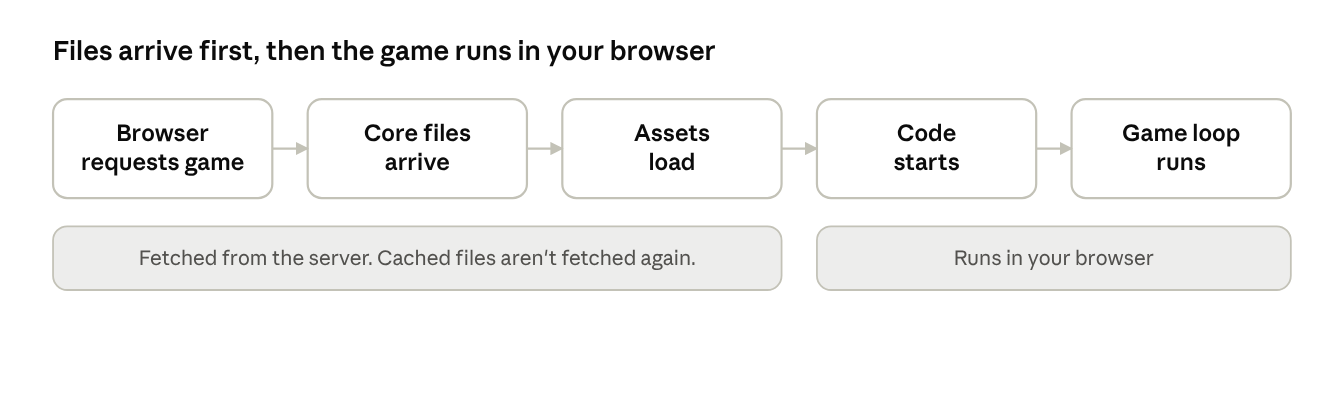
This is also why a game may open faster the second time. Any files the browser has cached don't need to be fetched again.
Why this replaced browser plugins
Browser games used to rely on add-ons, most famously Adobe Flash. Adobe ended support for Flash at the end of 2020. Because HTML5 games run on features built into modern browsers, they need no plugin, and the same game can often work on both a phone and a computer.
For example, Max Fury lets you tap the sides of the screen on mobile or use the arrow keys on a computer.
The trade-offs
Instant games aren't better than installed games in every way.
What they do well:
They start quickly and don't take up space as installed apps.
They're easy to try, drop and share with a link.
One version can serve many kinds of device.
Where they have limits:
Most need a connection to load, and multiplayer modes need one throughout.
Browsers share your device's memory with other tabs and apps, which can affect big games.
The biggest console-style games still tend to run better as installed software.
That's why instant games tend to focus on clear ideas and short sessions, where fast loading matters more than huge worlds.
Try it yourself
The easiest way to see the difference is to open a game and time it. Pick anything from our casual and puzzle games, press play and see how long it takes to start. If it feels slow on your phone, our guide to smoother gaming on a budget phone has some practical fixes.
Sources
MDN Web Docs, Canvas API.
MDN Web Docs, WebGL: 2D and 3D graphics for the web.
MDN Web Docs, WebAssembly.
MDN Web Docs, Web Audio API.
MDN Web Docs, HTTP caching.
MDN Web Docs, Anatomy of a video game.
Adobe, Adobe Flash Player End of Life.
Funplay, Max Fury game listing.